Ask anyone to explain the difference between a VM and a container and you'll get the same answer: "containers are lightweight, VMs are heavy."
Cool. Not useful. Why are containers lightweight? What is Docker actually skipping?
If you're brand new to Docker, go read Docker for Dummies first. If you already know what a container is and want to understand the mechanics, you're in the right place.
It all comes down to how each of them actually talks to the hardware.
Virtual Machines
A VM is a full operating system running inside your host machine. It gets its own virtual hardware, its own kernel, a fixed chunk of RAM and disk locked down from the start.
SSH into a VM and it has no idea it's sharing a CPU with anything else. As far as it's concerned, it owns the metal.
The software doing this is the hypervisor. It sits between the physical hardware and your VMs, carving out resources and keeping everything separated.
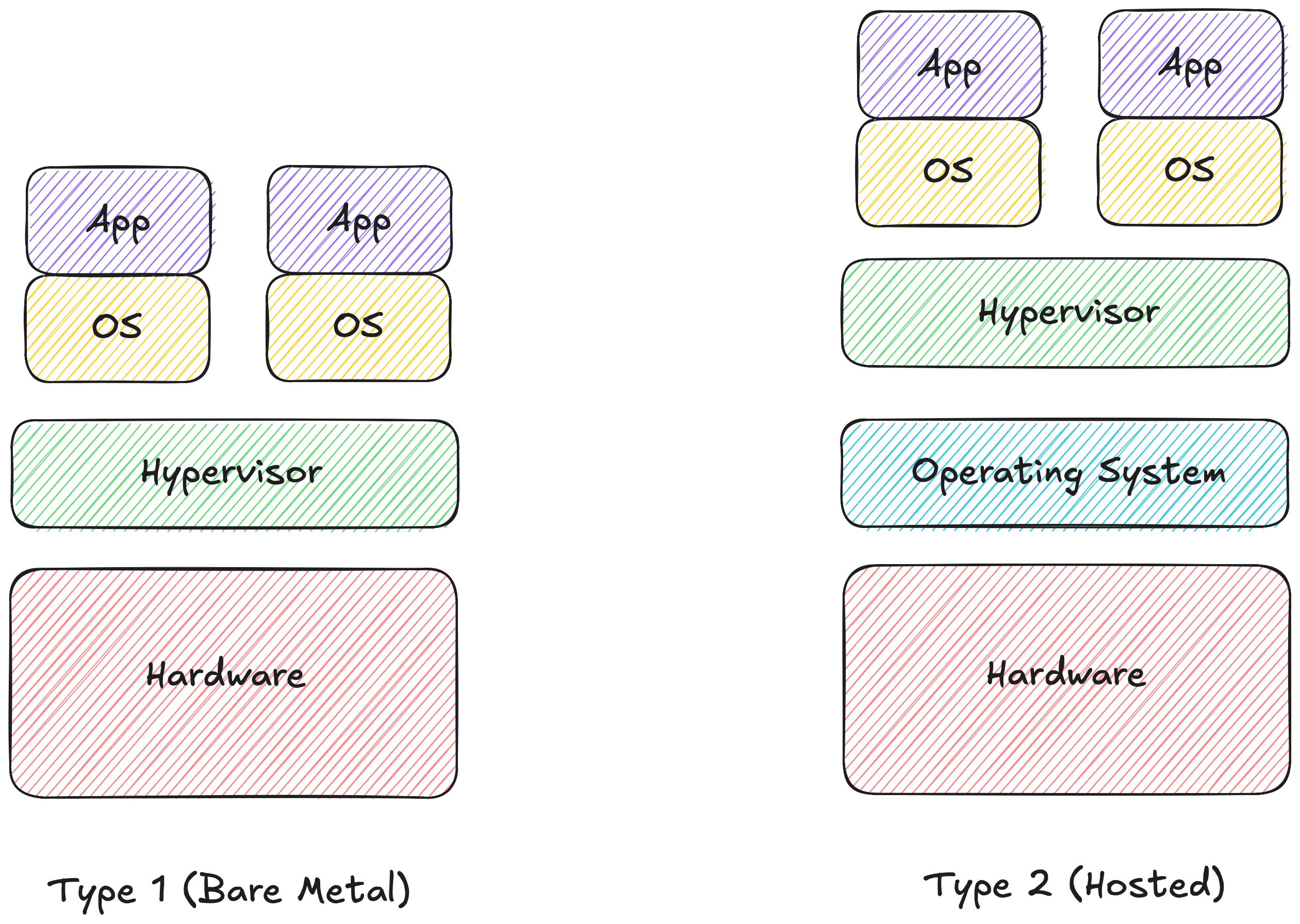
Two types:
- Type 1 (Bare-Metal): Runs straight on the hardware, no host OS in between. ESXi, KVM, Hyper-V. This is what AWS, GCP, and every serious datacenter runs. Minimal overhead, closest to the metal.
- Type 2 (Hosted): Runs as an app on top of an existing OS. VirtualBox, VMware Workstation. If you've ever fired up an Ubuntu VM on your Mac to test something, that's a Type 2. Works fine but every hardware request passes through your host OS first.
VM isolation is rock solid. If VM #1 hits a kernel panic, VM #2 won't even flinch. The catch is every instance makes you run a full OS. Gigabytes of storage. Memory reserved up front whether the VM is doing anything or not.
If you want to go deeper on the hypervisor rabbit hole, VMware's breakdown of Type 1 vs Type 2 is solid.
Containers
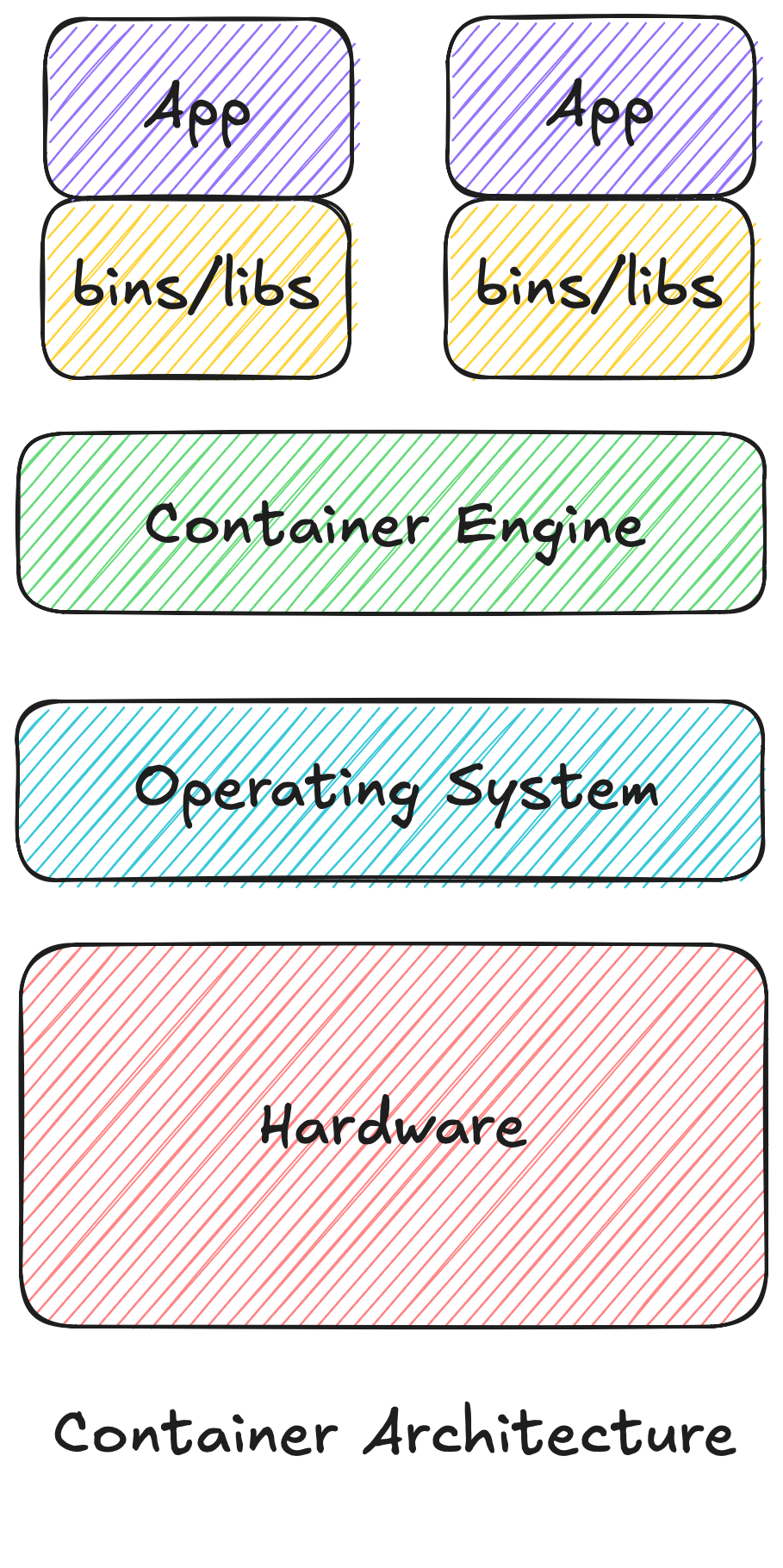
Containers throw out the hypervisor entirely. No hardware virtualization, no separate guest OS booting up.
A container is just a regular Linux process running directly on your host machine, stuck inside its own isolated box using two kernel features that have existed for decades:
- Namespaces: Control what the process can see. Isolated view of the PID tree, network interfaces, mount points, user IDs. The process thinks it owns the machine.
- cgroups (Control Groups): Control what the process can use. Hard limits on CPU, memory, disk I/O. A misbehaving container can't tank the whole host.
Run ps aux on your host and a Docker container shows up as just another process ID. But inside the container, it thinks it's PID 1 on a standalone machine.
Because containers share the host kernel, boot time is basically zero. Milliseconds, not minutes. Megabytes, not gigabytes. You can run way more services on the same box compared to the VM era.
For the full story on how namespaces, cgroups, and OverlayFS actually work together at the kernel level, that's in Docker Engine Under the Hood.
Side by Side
| Feature | Virtual Machines | Containers |
|---|---|---|
| OS & Kernel | Full Guest OS + dedicated kernel per VM | Shares host Linux kernel |
| Management Layer | Hypervisor (Type 1 or Type 2) | Container Engine (Docker, containerd) |
| Boot Time | 30 seconds to minutes | Milliseconds |
| Resource Usage | Fixed pre-allocation | Dynamic, only what's needed |
| Isolation Boundary | Hardware level (Virtualized HW) | OS level (Namespaces & cgroups) |
| Storage Footprint | Gigabytes per instance | Megabytes per instance |
| Primary Use Case | Hard isolation, running different OS | Microservices, rapid deploys, local dev |
The Real Trade-off
Isolation vs. efficiency. That's it.
VMs give you hard walls. Running Windows on a Linux machine, running untrusted code in a multi-tenant setup: VMs are the right call and there's no substitute.
Containers give you speed and density. For backend services, API endpoints, local dev environments: spinning up a full OS per app is unnecessary overhead.
In practice you don't even have to pick one. Most cloud setups run Docker containers inside VMs anyway. AWS ECS, Google Cloud Run, Azure Container Instances all work this way.
From here: Production Docker covers how to build lean, fast images. Docker Compose covers what happens when you need to run multiple containers together.